SharePoint Integration

SharePoint 2010: Pretty Good, But It Needs Help to Be Really Great

SharePoint 2010 is a powerful enterprise content management system, but its insufficient indexing tools leave content thin on metadata. As an enterprise repository quickly grows from mega to giga to tera to peta proportions, it becomes increasingly unmanageable and more difficult for users to find the documents they need. The solution is effective metadata, easily and accurately applied. Adding robust and accurate metadata will dramatically improve the user experience, making it easier to file and share documents, locate and retrieve information, and collaborate with colleagues.

Integrating with purpose-built software can raise SharePoint to higher levels of functionality. Data Harmony®’s MAIstro software — Thesaurus Master® and M.A.I™ — supplements SharePoint with semantic enhancements that help SharePoint users realize the full value of their information assets.

How can Data Harmony enhance SharePoint 2010?

Taxonomy management

The foundation for enterprise content management is metadata management, based on a thoughtfully constructed taxonomy. The system must be user-friendly, helpful, and standards-compliant. The thesaurus can add value at every stage where a user deals with content.

SharePoint 2010 enables basic importing of an external taxonomy file and some ongoing management, but it lacks a truly useful taxonomy management tool. Enterprise terminology never stops changing, and a taxonomy must respond to reflect that change. Managing an evolving vocabulary is an ongoing process--adding, modifying, and deleting terms, rearranging positions, building hierarchical and associative relationships between terms to show their semantic links, adding scope notes, maintaining term histories. Custom term information and relationships are often needed, especially if the taxonomy is seen as leading to a full ontology.

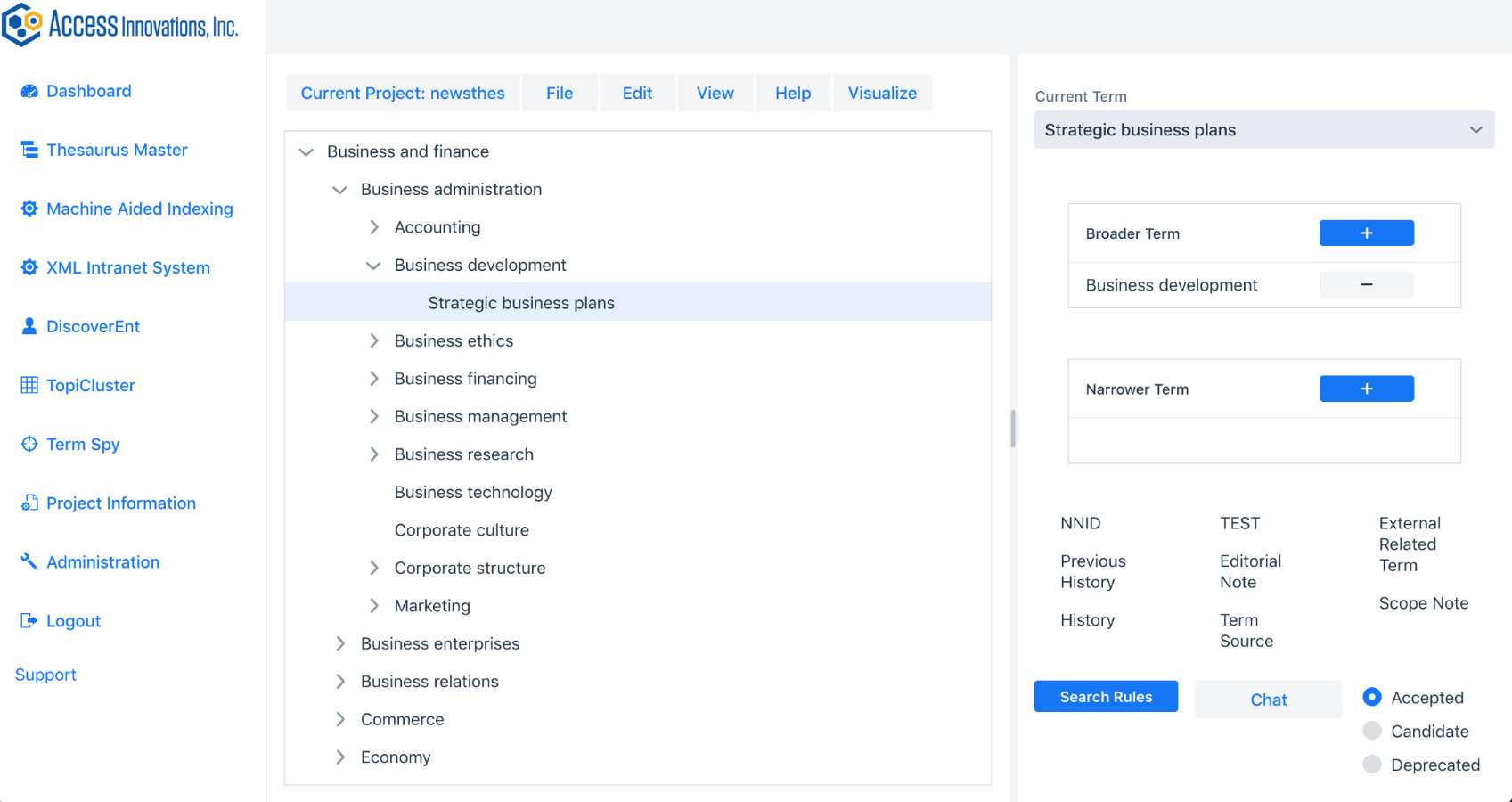
What's needed is software that handles all those features and the potential for further development and makes the clerical and administrative side of the job easy. Data Harmony’s Thesaurus Master® provides a simple and intuitive one-stop interface that taxonomists appreciate. Its administrative module enables users to customize term records for important term relationships, category fields, and note fields. Fully standards-compliant, Thesaurus Master provides all the features taxonomists expect and rely on to produce a tagging vocabulary with conceptual and semantic richness that can add value at each stage of content use.

Expanded semantic relationships

A semantically rich taxonomy does more than provide terms for concepts. It organizes concepts into a hierarchical arrangement from general to specific topics. It captures synonyms and other alternative expressions of the concept. In addition, it can provide notes for taxonomists, indexers, and end users to clarify how terms should be used. Even more powerful are associative relationships - Related Terms - which let users know about other topics in the taxonomy that are conceptually linked to a given term, topics that may be in a separate branch of the taxonomy and not immediately evident. These topics help expand a user’s awareness of other content likely to be of interest. The associative relationship can be broadly applied to indicate not only associated documents but also upcoming events and other projects and products on the topic. They can help a user discover colleagues working on related topics, stimulating collaboration. Ultimately these links can promote sales, productive interactions, and member engagement within an organization. SharePoint does not support Related Terms in taxonomies and fails to capture these important conceptual associations. Integrating Data Harmony’s Thesaurus Master with SharePoint overcomes this failure.

Access to the full taxonomy

Users uploading and ready to tag a document must find a descriptive taxonomy term to apply as metadata. The user can browse the taxonomy...through SharePoint’s tiny window of only ten lines. This means the searcher must manipulate the content in the window, scrolling, expanding, and contracting branches to locate the correct term. Though SharePoint’s taxonomy module includes a search function, there is no taxonomy search available for the user contributing an article. Browsing through even a modestly sized taxonomy can be discouraging, and scanning through a large file with up to 1,000 terms on one level and up to seven hierarchy levels deep - limits set by SharePoint - is likely to leave users either lost or looking for any way to avoid contributing metadata. Integrating with Thesaurus Master, a dedicated taxonomy management software, overcomes this obstacle and provides users with full term record information.

Automated tagging: simpler and more precise semantic enrichment

Document contributors are notoriously reluctant to add tags when uploading their work. Relying on SharePoint’s manual, unassisted approach to indexing requires the user to know or guess at a term and then either key it into the metadata field or navigate through the small window to locate it, select, and click to apply. Though an invalid or incorrectly spelled term appears in red, it is not rejected. SharePoint’s typeahead feature is useful only if the user knows the correct first word of the term. Unlike Thesaurus Master, it does not suggest valid terms which may appear in permuted format.

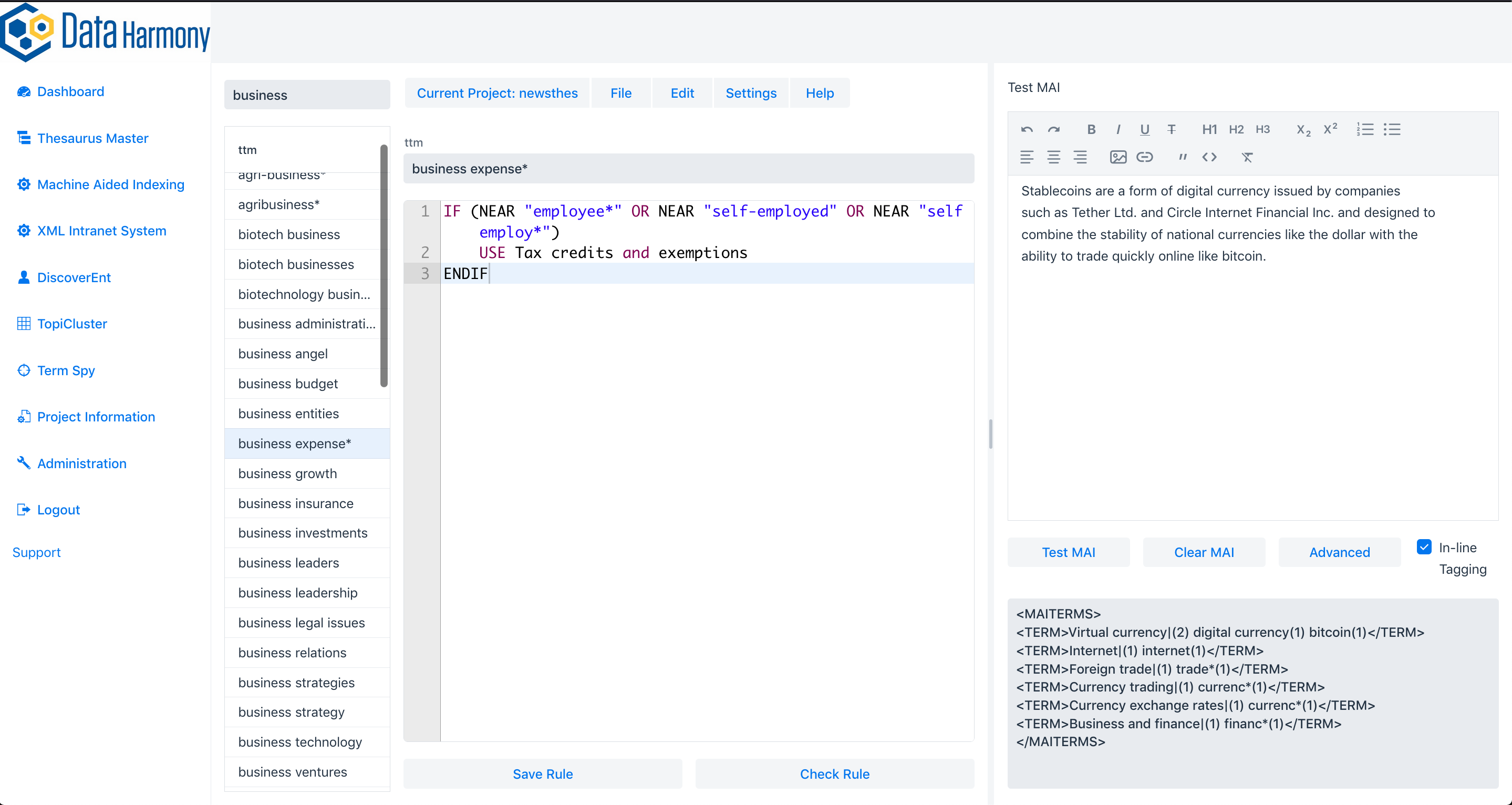
Data Harmony’s M.A.I. with SharePoint makes the user’s job easier, faster, and more precise. M.A.I. automatically populates the subject metadata field for an uploaded document, drawing on the project’s specific taxonomy and using manageable rules to interpret the subject matter. The rules are transparent and easily edited for improved accuracy. Suggested terms go beyond basic word-matching to capture the underlying concepts expressed in a document. Users can accept or delete suggested terms, view the taxonomy, find other terms not suggested and paste them in the field, where terms are verified and accepted.

Consistency and precision are key for reliable tagging and retrieval. While M.A.I. serves as an editorial aid when adding a single document, it functions as well as an automatic categorizer tagging volumes of files for batch upload to SharePoint, solving the problem of metatagging a large collection of legacy files uploaded to the repository.

SharePoint lets users submitting documents add their own uncontrolled descriptors to their documents, in folksonomic fashion. These author keywords are incorporated into SharePoint's Managed Keywords, a flat and ungoverned collection. The terms are then available for later users, compounding problems that result from the absence of recognized and approved terminology. While it is good to capture candidate terms recommended by users as potential additions to the taxonomy, best practices require, and Data Harmony facilitates, a methodology for reviewing candidate terms to determine their usefulness, avoid redundancy, standardize terminology, and link concepts to existing terms appropriately.

Document search

While SharePoint enables full text or metadata searching, combining search with a rich taxonomy can deliver much more. The hierarchical and associative term relationships displayed through Data Harmony’s NavTree can enhance the searcher’s experience by displaying concepts related to the search, using the taxonomy hierarchy to suggest ways to broaden or narrow the search, along with related concepts in other branches. This expanded awareness can lead to new insights for critical decision making, increased sales, productive collaboration and much more.

SharePoint also provides a navigation view of the taxonomy to browse topics and retrieve content. However, again, the constricted window size makes browsing laborious. The ability to explore the taxonomy without limits through Search Harmony presentation features delivers more satisfying and informative results.

Collaboration through discovered metadata

Each time a writer contributes a document in SharePoint, an opportunity for collaboration and networking on the topic arises. Through M.A.I., the automatic tagging with subject metadata can be imported to a user’s profile to indicate areas of expertise. This information provides the basis for discovery of similar interests, supporting others seeking in-house experts on a topic, and contributing to new interactions and organizational productivity.

How to make a good thing great – Integrate!

SharePoint 2010 has evolved as an enterprise content management system with the goal of meeting the needs of a broad range of users, document writers, content managers, project administrators, IT specialists, knowledge professionals and more. It provides many functions and serves well on most. However, SharePoint lacks the ability to make full use of the semantic richness of a well-designed and constructed taxonomy, and fails on several important taxonomy-based functions:

  1. comprehensive taxonomy management
  2. extended subject metadata, including Related Terms for categorization
  3. document contributor access to the taxonomy for metatagging
  4. immediate and accurate term suggestions for efficient tagging
  5. expanded search through semantic associations
  6. collaboration through discovered metadata

The Data Harmony suite of taxonomy management software enhances and expands SharePoint’s capabilities with precise metatagging, accurate retrieval, easy access to terms, expanded awareness of concepts, and collaboration based on shared metadata – all based on well constructed, standards-compliant taxonomies.